新源Ubuntu 14.04 搜狐更新源及安装软件
Ubuntu 14.04搜狐更新源及安装软件linux教程http://www. linuxprobe. com/
Ubuntu 14.04搜狐更新源及安装软件sudo vim /etc/apt/source. list
#将软件源改为sohu的deb http://mirrors. sohu. com/ubuntu/ trusty main restricted universe multiverse deb http://mirrors. sohu. com/ubuntu/ trusty-security main restricted universe multiverse deb http://mirrors. sohu. com/ubuntu/ trusty-updates main restricted universe multiverse deb http://mirrors. sohu. com/ubuntu/ trusty-proposed main restricted universe multiverse deb http://mirrors. sohu. com/ubuntu/ trusty-backports main restricted universe multiverse deb-src http://mirrors. sohu.com/ubuntu/ trusty main restricted universe multiverse deb-src http://mirrors. sohu.com/ubuntu/ trusty-security main restricted universe multiverse deb-src http://mirrors. sohu.com/ubuntu/ trusty-updates main restricted universe multiverse deb-src http://mirrors. sohu.com/ubuntu/ trusty-proposed main restricted universe multiverse deb-src http://mirrors. sohu.com/ubuntu/ trusty-backports main restricted universe multiverse
2. 更新并升级已有软件并安装一些基础依赖库apt-get update apt-get upgrade apt-get install libcurl3-dbg curl libpcre3 libpcre3-dev libcurl4-openssl-dev libyaml-dev
3. 安装软件
&bull ;Nginx/MySQL/Redis/Git/SVN apt-get install nginx mysql-server redis-server git subversion
&bull ;PHP及核心扩展apt-get install php5
#中途出现apache相关的警告和错误说明系统默认安装了Apache卸载之apt-get remove apache2apt-get autoremove
#安装核心扩展apt-get install php5-dev php5-cgi php5-cli php5-fpm php5-common php5-mysql php5-curl php5-dbg php5-json php5-gd php5-mcrypt php5-redis
&bull ;Composer curl -sS https://getcomposer.org/installer | php sudo mv composer.phar /usr/local/bin/composer
&bull ;PHP在PECL上的扩展Yaf/Yar等扩展
pecl install yaml pecl install yaf pecl isntall yar
&bull ;Phalcon
#下载的源码放在/source 目录下git clone --depth=1git://github.com/phalcon/cphalcon.git cd cphalcon/build sudo ./install
配置sudo vim /etc/php5/mods-available/private. ini extension=yaml. so extension=yaf. so extension=yar. so extension=phalcon. so extension=swoole. so ln -s /etc/php5/mods-available/private. ini /etc/php5/fpm/conf.d/30-private. ini ln -s /etc/php5/mods-available/private. ini /etc/php5/cli/conf.d/30-private. ini ln -s /etc/php5/mods-available/private. ini /etc/php5/cgi/conf.d/30-private. ini linux教程http://www. linuxprobe. com/
- 新源Ubuntu 14.04 搜狐更新源及安装软件相关文档
- HPScanjetEnterpriseFlowN9120fn2
- 投标ubuntu更新源
- 讲授ubuntu更新源
- 安装ubuntu更新源
- 如何在自己的Linux上安装VeeamPN
- 安装ubuntu更新源
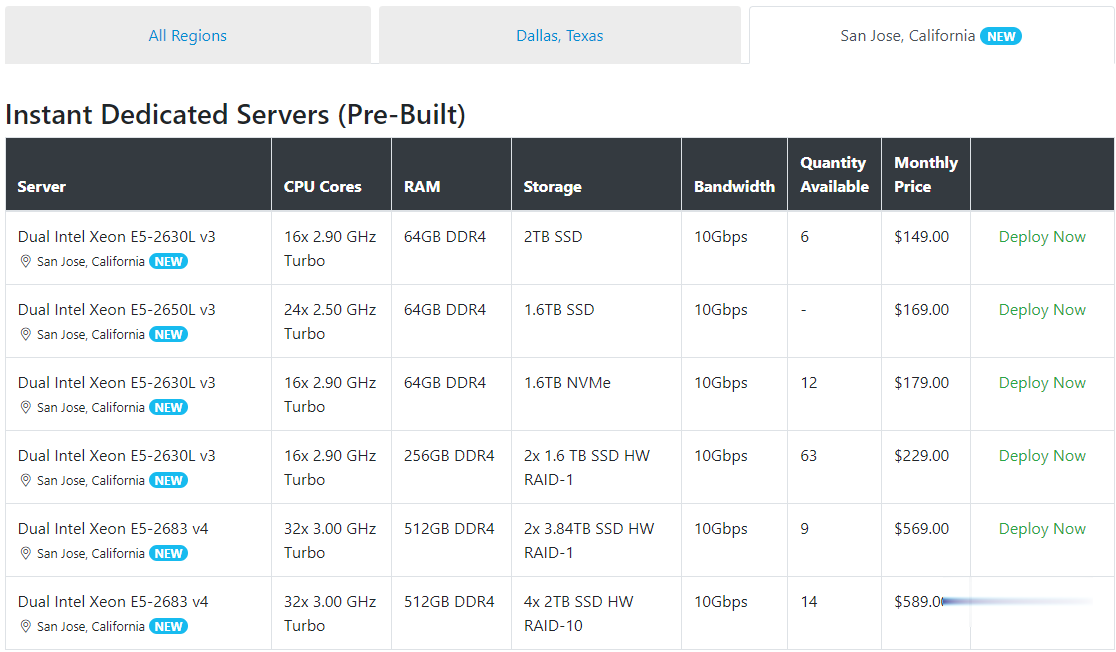
Spinservers美国圣何塞服务器$111/月流量10TB
Spinservers是Majestic Hosting Solutions,LLC旗下站点,主营美国独立服务器租用和Hybrid Dedicated等,数据中心位于美国德克萨斯州达拉斯和加利福尼亚圣何塞机房。TheServerStore.com,自 1994 年以来,它是一家成熟的企业 IT 设备供应商,专门从事二手服务器和工作站业务,在德克萨斯州拥有 40,000 平方英尺的仓库,库存中始终有...
3C云1核1G 9.9元 4核4G 16元 美国Cera 2核4G 24元
3C云互联怎么样?3C云互联专注免备案香港美国日本韩国台湾云主机vps服务器,美国高防CN2GIA,香港CN2GIA,顶级线路优化,高端品质售后无忧!致力于对互联网云计算科技深入研发与运营的极客共同搭建而成,将云计算与网络核心技术转化为最稳定,安全,高速以及极具性价比的云服务器等产品提供给用户!专注为个人开发者用户,中小型,大型企业用户提供一站式核心网络云端服务部署,促使用户云端部署化简为零,轻松...
腾讯云轻量服务器老用户续费优惠和老用户复购活动
继阿里云服务商推出轻量服务器后,腾讯云这两年对于轻量服务器的推广力度还是比较大的。实际上对于我们大部分网友用户来说,轻量服务器对于我们网站和一般的业务来说是绝对够用的。反而有些时候轻量服务器的带宽比CVM云服务器够大,配置也够好,更有是价格也便宜,所以对于初期的网站业务来说轻量服务器是够用的。这几天UCLOUD优刻得香港服务器稳定性不佳,于是有网友也在考虑搬迁到腾讯云服务器商家,对于轻量服务器官方...

-
中国互联网域名注册什么叫做网络域名 怎么注册网络域名 以及它的收费方式域名备案查询如何查看网站备案已经成功便宜的虚拟主机免费、便宜的虚拟主机哪里有?要好用的 ,速度快的个人虚拟主机个人建网站用哪一种虚拟主机???香港虚拟空间香港虚拟空间 好不、现在还有人买嘛免备案虚拟空间免备案的虚拟主机空间,买了以后会强制备案不?网站空间购买购买网站空间需要注意什么网站空间商网站空间商怎么查询网站空间免备案想买一个网站空间,大家给推荐个稳定的,速度的,免备案的?apache虚拟主机linux操作系统Apache配置虚拟主机