硬盘数据恢复硬盘数据恢复(HDD data recovery)
硬盘数据恢复HDD data recovery
Can you also for the hard disk data recovery.
The hard disk has price data is priceless, now more and moreusers have such a concept, but only in the real data when thecrisis will have personal experience, although the computerdata is stored in the disk is so important, but due to technicalreason, any storage devices have damaged the risk. Operatingenvironment changes and deterioration, illegal operations ortorture type operation, the destruction of the virus and hackerintrusion, and abnormal situation is difficult to avoid, maylead to scrap storage devices and software system collapse.Many of my friends think that data recovery is a highlyprofessional work, need to have a thorough understanding of thedisk structure and file system, really so mysterious? In fact,for some simple software data loss, we ourselves will be ableto solve the problem, not only can save a lot of cost, but alsoon their computer level is also a rare opportunity. Xiao Biantoday and you talk about some of the data recovery solution.Once the encounter data crisis, maintain a take it leisurelyand unoppressively attitude is very important, he appears arelikely to cause more damage, let could restore the data becomeunable to save. In fact, save million value their data is notas Tan, as long as the master some skills and methods properly,you may simply play the heroic role to save the crisis data.In data loss, an antidote against the disease
An antidote against the disease, which data can be saved?Data
problems mainly include two categories: logic and hardwareproblems, the corresponding recovery were also known assoftware and hardware recovery recovery. Software recoveryrefers to repair the data through software, the whole processdoes not involve hardware maintenance. While the cause of dataloss is often the virus infection, wrong format, error, errorpartition cloning, deleted operation, power etc. .
The characteristics of software fault is unable to enter theoperating system, the file cannot be read, file cannot be opened,the associated application file is missing, missingpartition,display garbled. In fact, the cause of software data loss isvery complex, and each has specific symptoms, or a variety ofsymptoms at the same time. In general, as long as it is notcompletely cover the data area, individual users through somespecific software, basically can be recovered.
In the most common deletion in this case, stored in the harddisk file is not completely overwritten, through some specificsoftware method, according to the master boot partition, DBR,FAT, the last file recovery sequence to solve the entity; ofcourse should objectively admit that, although the software ofdata there are a lot of details of the restoration techniquesand to simple expression of experience, but also there is theexisting software recovery technique is incapable of action.If the data in the hard disk is fully covered or partiallycovered by several times, it is possible to use any softwarecan not repair.
The boot -off suddenly, after the restart can not find system
I believe many of my friends have encountered such a situation,when we use the computer is a sudden power failure, can detectthe hard disk to boot, but can not enter into the system, orDISK BOOT FAILURE, INSERT "SYSTEN DISK AND PRESS ENTER".As this situation is generally the fault master boot disk, youonly need a few minutes to fix. Above this kind of fault aboutoccupy the whole software failure in 30%, so the society is asolution to this problem to master an effective killer. Inaddition to remind everyone that, if the boot after the prompt"Miss operation system"and DOS can see the C complete content,which is part of the master boot failure.
For this type of software fault, we can absolutely solve. Youcan start the system with a floppy disk.
Then type "C:", see if you can read the contents of the C. Thecause of this situation is more complex, according to differentdegrees of destruction of the master boot, C can be read is notdetermined. If C data can be read out, then as long as you usethe Fdisk/mbr command to unconditionally master boot area ingeneral can be successful, but also can keep the original data.It is worth noting that, when the system is running theFdisk/mbr command without any response, but in fact it hasplayed a role, because the hard disk partition table a smallamount of data, the writing time almost make people feel.Of course, if not read C, we can also use the Fdisk/mbr command.In fact, the Fdisk/mbr effect is very obvious, and can deal withsome of the main boot virus, we can make good use of, which iscalled the first tools to deal with the hard disk can be
identified and DOS cannot operate in BIOS; in addition to thehidden Fdisk parameter, you can also use the Fixmbr DOS gadget.After the execution of the file directly in the DOS, the systemwill automatically check the partition table structure,through the user confirmation after it began to automaticallyrepair. Compared with the Fdisk/mbr command, Fixmbr has abetter effect, the master boot Fdisk/mbr command can not solvemany problems can be easily fix it.
The use of PQ - Magic with partition, file missing
Fault: disk space allocation, the use of software from the newpartition partition or merge partitions, cause the file ismissing, or cannot be opened.
This failure is usually caused by the wrong partition table,partition table in a variety of software fault is a common fault,here we recommend the use of the DiskGenius software made byus. The software can be run directly in a pure DOS environment,and the use of Chinese intuitive interface, so it is not goodfor English users is the best choice.
DiskGenius software will be copied to the DOS disk can be rundirectly into the main interface of the DiskGenius, press theF10 can easily automatically restore the hard disk partitiontable, and this trick is very effective. DiskGenius will firstsearch 0 cylinder 0 head from the 2 sector to hidden sector,are seeking to move over the partition table. Then search thefirst sector of each head, wherein the search process can beapplied in "automatic" and "interactive" in two ways.
The automatic mode is suitable for most cases, suggest that youchoose this plan. Through the above on the master boot andrepair the partition table, you can make a serious damage tothe hard disk to see the correct partition in Windows, so asto lay solid foundation for other operations.
Manual repair: in some cases, any software cannot f ind backuppartition table, you can only manually modify. The manual willbe completely modified by virtue of experience in operatingWinHex software directly under the partition table data. UseWinHex to open the disk. From"80" to "55AA" the end of the DPThard diskpartition table is the key, we here screenshot showingthe hard disk partition table is intact, it does not need tomodify.
But for an already damaged partition table, the end positionmay be completely deranged, at this time we can find a "55AA"logo to determine, because the next partition starting positiongoes forward a sector is a partition of the end position.According to the head, and then converted into digitalcylindrical sector 16 hex, and then use WinHex to write back.In addition, in the process of looking for the next "55AA"mayencounter a lot of interference and suggestions according tothe capacity of the hard disk partition according to judgment.The whole process of handwriting recovery the partition tableneed to have abundant practical experience, we can furtherstudy.
"Unable to open partition, the partition is not formatted""Fault: suddenly open a letter not normal, suggesting that "the
partition is not formatted"
The EasyRecovery can be used to retrieve the data file, the harddisk is the premise still have the information in the file anddata block. But in the process of deleting the file, format thehard disk after the operation, and then write a lot of newinformation on the partition, the need to restore data is likelyto be covered! At this time, in any case are not back to thedata. So, in order to improve the data rate of repair, you don'twant to repair the new partition or hard disk read and writeoperations. If you want to repair the partition is the bootpartition, we should immediately withdraw from the system, withanother hard disk to start, then use the software.
Li Xiao Bian summary
A few more hard disk data loss, basically we users can try ityourself, to restore to use different software, not necessarilyall good, but if we don't try it without opportunity, or needto spend money on professional resume, but Xiaobian feel, thepremise is that we have for our comparison of the hard disk theimportant data or documents, or if only some normal film or MP3file that small advice, do not perform data recovery, redo thesystem directly to the most simple format.
The landlord is hot
Do not look at regret?! DIY zanwei graphic interface cableinstallation details
? you account for a few?The use of computer in the history of
ten bad habits!
? how to make memory mixed into peaceful coexistenceMore "
- 硬盘数据恢复硬盘数据恢复(HDD data recovery)相关文档
- 加速硬盘优化加速(HDD optimization acceleration)
- 硬盘缅怀被历史掩埋的HDD硬盘
- 三星Intel傲腾内存延续混合硬盘解决方案 HDD超越SSD?
- 三星SSD硬盘将逐渐取代HDD机械硬盘,国产主控迎来春天
- 希捷企业级用户更钟爱HDD:希捷推万转12Gbps硬盘
- 希捷希捷公司2018财年Q4季度财报:HDD硬盘依然占据绝对比重,SSD硬盘比例依然不高
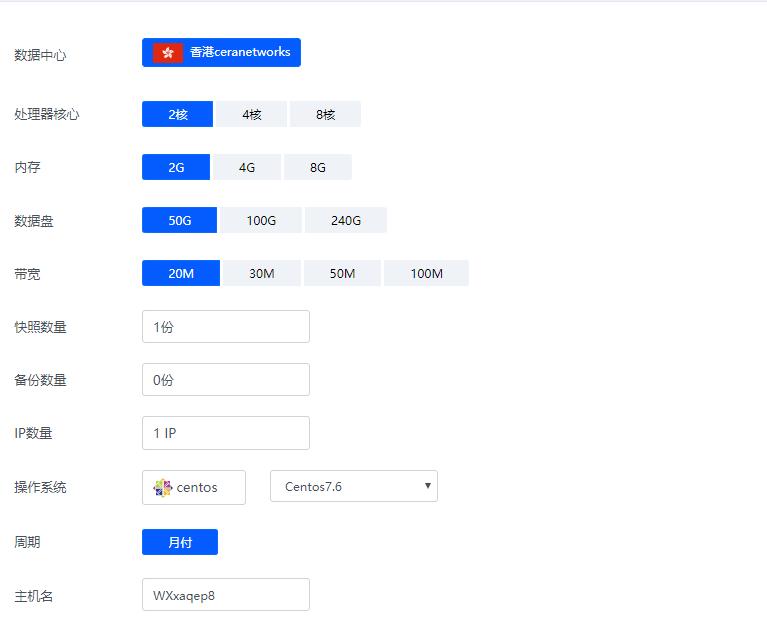
香港ceranetworks(69元/月) 2核2G 50G硬盘 20M 50M 100M 不限流量
香港ceranetworks提速啦是成立于2012年的十分老牌的一个商家这次给大家评测的是 香港ceranetworks 8核16G 100M 这款产品 提速啦老板真的是豪气每次都给高配我测试 不像别的商家每次就给1核1G,废话不多说开始跑脚本。香港ceranetworks 2核2G 50G硬盘20M 69元/月30M 99元/月50M 219元/月100M 519元/月香港ceranetwork...
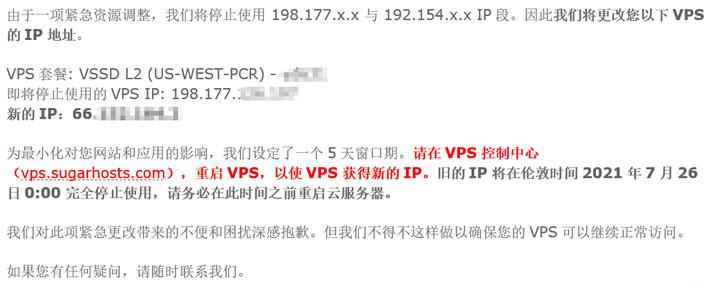
SugarHosts糖果主机商更换域名
昨天,遇到一个网友客户告知他的网站无法访问需要帮他检查到底是什么问题。这个同学的网站是我帮他搭建的,于是我先PING看到他的网站是不通的,开始以为是服务器是不是出现故障导致无法打开的。检查到他的服务器是有放在SugarHosts糖果主机商中,于是我登录他的糖果主机后台看到服务器是正常运行的。但是,我看到面板中的IP地址居然是和他网站解析的IP地址不同。看来官方是有更换域名。于是我就问 客服到底是什...
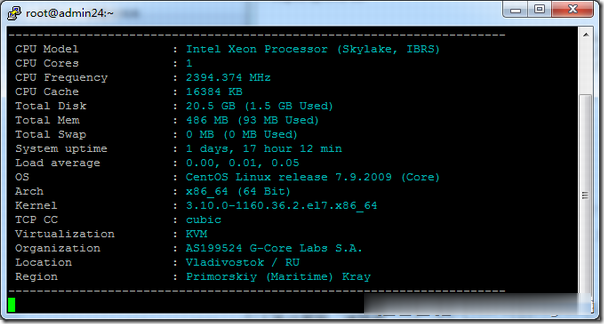
Gcore(gcorelabs)俄罗斯海参崴VPS简单测试
有一段时间没有分享Gcore(gcorelabs)的信息了,这是一家成立于2011年的国外主机商,总部位于卢森堡,主要提供VPS主机和独立服务器租用等,数据中心包括俄罗斯、美国、日本、韩国、新加坡、荷兰、中国(香港)等多个国家和地区的十几个机房,商家针对不同系列的产品分为不同管理系统,比如VPS(Hosting)、Cloud等都是独立的用户中心体系,部落分享的主要是商家的Hosting(Virtu...
-
请仔细阅读在本报告尾部的重要法律声明游戏iosexportingjavawindows键是哪个Windows快捷键是什么谷歌sb在谷歌里搜SB为什么结果中第一个是百度google分析谷歌的Search Console 和 Google Analytics有何区别google统计怎样将Google分析转换成中文显示Google中文专题交流杀毒软件免费下载2013排行榜哪里有免费好用的杀毒软件苹果5.1完美越狱iOS5.1.1完美越狱教程苹果5.1.1越狱你好,iphone5.1.1完美越狱,电脑上为什么连不上呢?只能显示充电,谢谢