css2 0中文手册CSS语言大全
CSS语言大全
字体属性:(font) 大小 {font-size: x-large;}(特大) xx-small;(极小) 一般中文用不到,只要用数值就可以,单位:PX、PD 样式 {font-style: oblique;}(偏斜体) italic;(斜体) normal;(正常) 行高 {line-height: normal;}(正常) 单位:PX、PD、EM 粗细 {font-weight: bold;}(粗体) lighter;(细体) normal;(正常) 变体 {font-variant: small-caps;}(小型大写字母) normal;(正常) 大小写 {text-transform: capitalize;}(首字母大写) uppercase;(大写) lowercase;(小写) none;(无) 修饰 {text-decoration: underline;}(下划线) overline;(上划线) line-through;(删除线) blink;(闪烁)
常用字体: (font-family) "Courier New", Courier, monospace, "Times New Roman", Times, serif, Arial, Helvetica, sans-serif, Verdana
背景属性: (background) 色彩 {background-color: #FFFFFF;} 图片 {background-image: url();} 重复 {background-repeat: no-repeat;} 滚动 {background-attachment: fixed;}(固定) scroll;(滚动) 位置 {background-position: left;}(水平)(垂直); 简写方法 {background:#000 url(..) repeat fixed ;} /*简写·这个在阅读代码中经常出现,要认真的研究*/
区块属性: (Block) /*这个属性第一次认识,要多多研究*/ 字间距 {letter-spacing: normal;} 数值 /*这个属性似乎有用,多实践下*/ 对齐 {text-align: justify;}(两端对齐) left;(左对齐) right;(右对齐) center;(居中) 缩进 {text-indent: 数值px;} 垂直对齐 {vertical-align: baseline;}(基线) sub;(下标) super;(下标); ; middle; bottom; text-bottom; 词间距word-spacing: normal; 数值 空格white-space: pre;(保留) nowrap;(不换行)
显示 {display:block;}(块) inline;(内嵌) list-item;(列表项) run-in;(追加部分)pact;(紧凑) marker;(标记) table; inline-table; table-raw-group; table-header-group; table-footer-group; table-raw; table-column-group; table-column; table-cell; table-caption;(表格标题) /*display 属性的了解很模糊*/
方框属性: (Box) width:; height:; float:; clear:both; margin:; padding:; 顺序:上右下左 边框属性: (Border) border-style: dotted;(点线) dashed;(虚线) solid; double;(双线) groove;(槽线) ridge;(脊状) inset;(凹陷) outset; border-width:; 边框宽度 border-color:#;
简写方法border:width style color; /*简写*/
列表属性: (List-style) 类型list-style-type: disc;(圆点) circle;(圆圈) square;(方块) decimal;(数字) lower-roman;(小罗码数字) upper-roman; lower-alpha; upper-alpha; 位置list-style-position: outside;(外) inside; 图像list-style-image: url(..); 定位属性: (Position) Position: absolute; relative; static; visibility: inherit; visible; hidden; overflow: visible; hidden; scroll; auto; clip: rect(12px,auto,12px,auto) (裁切)
css属性代码大全 一 CSS文字属性: color : #999999; /*文字颜色*/ font-family : 宋体,sans-serif; /*文字字体*/ font-size : 9pt; /*文字大小*/ font-style:itelic; /*文字斜体*/ font-variant:small-caps; /*小字体*/ letter-spacing : 1pt; /*字间距离*/ line-height : 200%; /*设置行高*/ font-weight:bold; /*文字粗体*/ vertical-align:sub; /*下标字*/ vertical-align:super; /*上标字*/ text-decoration:line-through; /*加删除线*/ text-decoration: overline; /*加顶线*/ text-decoration:underline; /*加下划线*/ text-decoration:none; /*删除链接下划线*/ text-transform : capitalize; /*首字大写*/ text-transform : uppercase; /*英文大写*/ text-transform : lowercase; /*英文小写*/ text-align:right; /*文字右对齐*/ text-align:left; /*文字左对齐*/ text-align:center; /*文字居中对齐*/ text-align:justify; /*文字分散对齐*/ vertical-align属性 ; /*垂直向上对齐*/ vertical-align:bottom; /*垂直向下对齐*/ vertical-align:middle; /*垂直居中对齐*/ vertical-align:; /*文字垂直向上对齐*/ vertical-align:text-bottom; /*文字垂直向下对齐*/ 二、CSS边框空白 :10px; /*上边框留空白*/ padding-right:10px; /*右边框留空白*/ padding-bottom:10px; /*下边框留空白*/ padding-left:10px; /*左边框留空白 三、CSS符号属性: list-style-type:none; /*不编号*/ list-style-type:decimal; /*阿拉伯数字*/ list-style-type:lower-roman; /*小写罗马数字*/ list-style-type:upper-roman; /*大写罗马数字*/ list-style-type:lower-alpha; /*小写英文字母*/ list-style-type:upper-alpha; /*大写英文字母*/ list-style-type:disc; /*实心圆形符号*/ list-style-type:circle; /*空心圆形符号*/ list-style-type:square; /*实心方形符号*/ list-style-image:url(/dot.gif); /*图片式符号*/ list-style-position: outside; /*凸排*/ list-style-position:inside; /*缩进*/ 四、CSS背景样式: background-color:#F5E2EC; /*背景颜色*/ background:transparent; /*透视背景*/ background-image : url(/image/bg.gif); /*背景图片*/ background-attachment : fixed; /*浮水印固定背景*/ background-repeat : repeat; /*重复排列-网页默认*/ background-repeat : no-repeat; /*不重复排列*/ background-repeat : repeat-x; /*在x轴重复排列*/ background-repeat : repeat-y; /*在y轴重复排列*/ 指定背景位置 background-position : 90% 90%; /*背景图片x与y轴的位置*/ background-position :; /*向上对齐*/ background-position : buttom; /*向下对齐*/ background-position : left; /*向左对齐*/ background-position : right; /*向右对齐*/ background-position : center; /*居中对齐*/ 五、CSS连接属性: a /*所有超链接*/ a:link /*超链接文字格式*/ a:visited /*浏览过的链接文字格式*/ a:active /*按下链接的格式*/ a:hover /*鼠标转到链接*/ 鼠标光标样式: 链接手指 CURSOR: hand 十字体 cursor:crosshair 箭头朝下 cursor:s-resize 十字箭头 cursor:move 箭头朝右 cursor:move 加一问号 cursor:help 箭头朝左 cursor:w-resize 箭头朝上 cursor:n-resize 箭头朝右上 cursor:ne-resize 箭头朝左上 cursor:nw-resize 文字I型 cursor:text 箭头斜右下 cursor:se-resize 箭头斜左下 cursor:sw-resize 漏斗 cursor:wait 光标图案(IE6) p {cursor:url("光标文件名.cur"),text;} 六、CSS框线一览表: : 1px solid #; /*上框线*/ border-bottom : 1px solid #; /*下框线*/ border-left : 1px solid #; /*左框线*/ border-right : 1px solid #; /*右框线*/ 以上是建议书写方式,但也可以使用常规的方式 如下: -color : #369 /*设置上框颜色*/ -width :1px /*设置上框宽度*/ -style : solid/*设置上框样式*/ 其他框线样式 solid /*实线框*/ dotted /*虚线框*/ double /*双线框*/ groove /*立体内凸框*/ ridge /*立体浮雕框*/ inset /*凹框*/ outset /*凸框*/ 七、CSS表单运用: 文字方块 按钮 复选框 选择钮 多行文字方块 下拉式菜单 选项1选项2 八、CSS边界样式: :10px; /*上边界*/ margin-right:10px; /*右边界值*/ margin-bottom:10px; /*下边界值*/ margin-left:10px; /*左边界值*/ CSS 属性: 字体样式(Font Style) 序号 中文说明 标记语法 1 字体样式 {font:font-style font-variant font-weight font-size font-family} 2 字体类型 {font-family:"字体1","字体2","字体3",...} 3 字体大小 {font-size:数值|inherit| medium| large| larger| x-large| xx-large| small| smaller| x-small| xx-small} 4 字体风格 {font-style:inherit|italic|normal|oblique} 5 字体粗细 {font-weight:100-900|bold|bolder|lighter|normal;} 6 字体颜色 {color:数值;} 7 阴影颜色 {text-shadow:16位色值} 8 字体行高 {line-height:数值|inherit|normal;} 9 字 间 距 {letter-spacing:数值|inherit|normal} 10 单词间距 {word-spacing:数值|inherit|normal} 11 字体变形 {font-variant:inherit|normal|small-cps } 12 英文转换 {text-transform:inherit|none|capitalize|uppercase|lowercase} 13 字体变形 {font-size-adjust:inherit|none} 14 字体 {font-stretch:condensed|expanded|extra-condensed|extra-expanded|inherit|narrower|normal| semi-condensed|semi-expanded|ultra-condensed|ultra-expanded|wider} 文本样式(Text Style) 序号 中文说明 标记语法 1 行 间 距 {line-height:数值|inherit|normal;} 2 文本修饰 {text-decoration:inherit|none|underline|overline|line-through|blink} 3 段首空格 {text-indent:数值|inherit} 4 水平对齐 {text-align:left|right|center|justify} 5 垂直对齐 {vertical-align:|bottom||text-bottom|baseline|middle|sub|super} 6 书写方式 {writing-mode:lr-tb|tb-rl} 背景样式 序号 中文说明 标记语法 1 背景颜色 {background-color:数值} 2 背景图片 {background-image: url(URL)|none} 3 背景重复 {background-repeat:inherit|no-repeat|repeat|repeat-x|repeat-y} 4 背景固定 {background-attachment:fixed|scroll} 5 背景定位 {background-position:数值|bottom|left|right|center} 6 背影样式 {background:背景颜色|背景图象|背景重复|背景附件|背景位置} 框架样式(Box Style) 序号 中文说明 标记语法 1 边界留白 {margin: margin-right margin-bottom margin-left} 2 补 白 {padding: padding-right padding-bottom padding-left} 3 边框宽度 {border-width:-width border-right-width border-bottom-width border-left-width} 宽度值: thin|medium|thick|数值 4 边框颜色 {border-color:数值 数值 数值 数值} 数值:分别代、right、bottom、left颜色值 5 边框风格 {border-style:none|hidden|inherit|dashed|solid|double|inset|outset|ridge|groove} 6 边 框 {border:border-width border-style color} 上 边 框 {:-width border-style color} 右 边 框 {border-right:border-right-width border-style color} 下 边 框 {border-bottom:border-bottom-width border-style color} 左 边 框 {border-left:border-left-width border-style color} 7 宽 度 {width:长度|百分比| auto} 8 高 度 {height:数值|auto} 9 漂 浮 {float:left|right|none} 10 清 除 {clear:none|left|right|both} 分类列表 序号 中文说明 标记语法 1 控制显示 {display:none|block|inline|list-item} 2 控制空白 {white-space:normal|pre|nowarp} 3 符号列表 {list-style-type:disc|circle|square|decimal|lower-roman|upper-roman|lower-alpha|upper-alpha|none} 4 图形列表 {list-style-image:URL} 5 位置列表 {list-style-position:inside|outside} 6 目录列表 {list-style:目录样式类型|目录样式位置|url} 7 鼠标形状 {cursor:hand|crosshair|text|wait|move|help|e-resize|nw-resize|w-resize|s-resize|se-resize|sw-resize}
- css2 0中文手册CSS语言大全相关文档
- css2 0中文手册一个页面即有2号字4号字怎么定义字体不受IE的调整影响?
- css2 0中文手册什么是DHTM
- css2 0中文手册关于CSS中@font-face 嵌入字体的用法
- css2 0中文手册CSS代码含义~
- css2 0中文手册完成所示网页,使用表格布局,使用CSS控制样式,表格第一行日期是使用JS显示的系统当前日期。
- css2 0中文手册CSS样式表 语法到哪里去找?
半月湾($59.99/年),升级带宽至200M起步 三网CN2 GIA线路
在前面的文章中就有介绍到半月湾Half Moon Bay Cloud服务商有提供洛杉矶DC5数据中心云服务器,这个堪比我们可能熟悉的某服务商,如果我们有用过的话会发现这个服务商的价格比较贵,而且一直缺货。这里,于是半月湾服务商看到机会来了,于是有新增同机房的CN2 GIA优化线路。在之前的文章中介绍到Half Moon Bay Cloud DC5机房且进行过测评。这次的变化是从原来基础的年付49....

HostKvm四月优惠:VPS主机全场八折,香港/美国洛杉矶机房$5.2/月起
HostKvm是一家成立于2013年的国外主机服务商,主要提供基于KVM架构的VPS主机,可选数据中心包括日本、新加坡、韩国、美国、中国香港等多个地区机房,均为国内直连或优化线路,延迟较低,适合建站或者远程办公等。本月商家针对全场VPS主机提供8折优惠码,优惠后美国洛杉矶VPS月付5.2美元起。下面列出几款不同机房VPS主机产品配置信息。套餐:美国US-Plan0CPU:1cores内存:1GB硬...
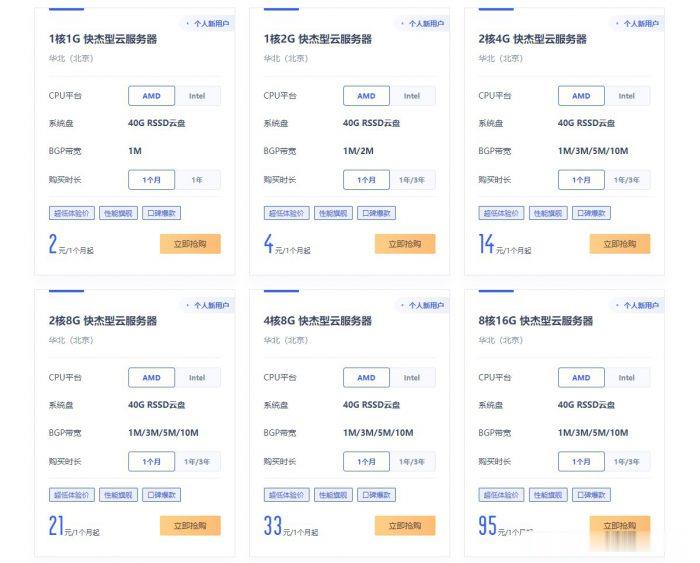
ucloud国内云服务器2元/月起;香港云服务器4元/首月;台湾云服务器3元/首月
ucloud云服务器怎么样?ucloud为了扩大云服务器市场份额,给出了超低价云服务器的促销活动,活动仍然是此前的Ucloud全球大促活动页面。目前,ucloud国内云服务器2元/月起;香港云服务器4元/首月;台湾云服务器3元/首月。相当于2-4元就可以试用国内、中国香港、中国台湾这三个地域的云服务器1个月了。ucloud全球大促仅限新用户,国内云服务器个人用户低至56元/年起,香港云服务器也仅8...
-
avbAVBⅢ首选的治疗措施是什么?winhttp什么是winhttp.diimac地址克隆路由器中的MAC地址克隆,是什么,干嘛用的以图搜人怎样人肉搜人?只知道他名字和当初居住的地址腾讯汽车网可以了解汽车知识的权威网站大概有哪些awvAWV的转换器 要免费的 看好是AWV不是AMV微粒群算法粒子群算法优化下面的公式 要怎么做 能给个程序最好什么是网络地址手机IP地址是什么?红牛下架红牛停产了吗?2019年还生产吗?web推送WebSocket 是什么原理?如何实现消息实时推送