瘦身xp瘦身(XP slimming)
xp瘦身XP slimming
Downsizing: the first step in improving the speed of the XPsystem
Whether the new system, or the older the more you use, you candelete the system disk some redundant files, in order to savethe system disk space, improve the speed of the system.Step 1: backup system backup files
Install and update all drivers, and then backup to backup theentire C:\windows\system32\dllcache folder to another harddisk partition. Note: This is a hidden file. You need to openthe hidden properties of the system file. Backup this file isto solve later add new hardware device can not install thedriver problem!
The second step: run four commands, delete some of the lesscommonly used files or programs
1, delete XP own Messenger program. Start, open the run dialogbox, enter RunDll32, advpack.dll,
LaunchINFSect ion,%windir%\INF\msmsgs. inf, BLC.Remove, andthen click OK, OK.
2, reduce the boot disk scan waiting time. In run, type thechkntfs /t:0 command and enter the carriage.
3. Delete the system backup file and type "sfc. exe/purgecache"in the "run" command to enter.
4, disable the compressed folder, and type "Regsvr32 /uzipfldr.dll" in the "run" command and enter the carriage.5, let Windows XP Professional online speed up 20% gpedit.mscThe third step: change the default installation path for commonsoftware
1, in other large space partition, build a folder dedicated tothe installation of software, for example, in the D disk tobuild a new folder, such as: D:\ProgramFiles.
2, execute the start /run command, enter regedit, and open theregistry.
3, start the registry branch to the following
[HKEYLOCALMACHINE\SOFTWARE\Microsoft\Windows\CurrentVersi on] , found on the right side of the window is called the string"ProgramFilesDir", double-click the "C:\Program Files"numerical modification for"D:\ProgramFiles", to determine theexit, you can change the installation path of the commonly usedsoftware.
After this change, when you install the new software, you willsee that the default path given by the system has become
D:\ProgramFiles, and the direct point "next" will be enough.The fourth step: streamlining system files
1, delete custom desktop pictures
In the C:\WINDOWS file, delete all the ugly pictures called.BMP.Then go to C:\WINDOWS\WEB\WALLPAPER and delete the unnecessarydesktop pictures.
Then open the "my computer", "tools" menu to open the folderoptions "in the" view "to" Hide protected operating systemfiles and displays all the files and folders option beforeremoving the hook, and then click "OK" to exit.
2, delete user temporary files
Delete all files under the C:\Documents and Settings\user name(index \Cookies\)
Delete all files (user temporary files) under the C:\Documentsand Settings\ user name \Local Settings\Temp\
Delete all files (page files) under the C:\Documents andSettings\ user name \LocalSettings\TemporaryInternet Files\Delete all files (history records) under the C:\Documents andSettings\ user name \Local Settings\History\
3, delete the system is not common documents and temporary filesDelete the hidden file at $u. . Beginning with C:\windows\.Delete all files (temporary files) under the C:\WINDOWS\Temp\folder.
If the system is new, temporary file transfer, the above
documents can not be deleted.
Delete all files under the C:\WINDOWS\ServicePackFiles folder(upgrade backup files after SP1 or SP2) . If the XP SP3 isinstalled directly, the file cannot be found.
Delete the compressed file under the C:\WINDOWS\DriverCache\i386 folder (the driver' s backup file. Remember: beforedeleting, must insert the mobile hard disk, U disk, let thesystem automatically install, drive and then delete.
Delete all files under C:\WINDOWS\ Prefetch.
Delete all files under
C:\WINDOWS\SoftwareDistribut ion\download (system patches,temporary files) .
Delete all files under the C:\windows\system32\dllcache folder.Second steps were taken just now,
This step can be saved
4, delete the commonly used input method
Restart the computer, enter the safe mode, the C:WINDOWS\imefolder under the Chtime, imjp8_1 and imkr6_1 three documentsdirectly deleted (they correspond to traditional Chinese,Japanese, Han Wen) can be.
The fifth step: prevent new system junk files from beinggenerated again
1, transfer virtual memory
In the desktop right click on my computer to view the properties,select the Advanced tab, click the "properties" column of the"Settings" button, select the Advanced tab, click the "virtualmemory" column of the "change" button to enter the "virtualmemory"window. Select the system drive in the drive list (thetwo if you do not know the numerical change how appropriate,then write down the system drive) , then check the "no pagingfile" option, and then click "Settings" button; then clickother partition, select "custom size options" setting initialsize "and" maximum "(we put the two values just downrespectively, input) and then click" Settings "button, thenclick the OK button to exit and restart the computer to takeeffect at last!
For values, you can also set the minimum value to 1.5 times asmuch as the physical memory (that is, the size of your memory) ,and the maximum is set to 2. 5 times the physical memory! As formemory over 1G, none will be faster!
2, transfer Windows temporary file
Windows in the implementation of some trivial operations (suchas decompression files) , the document is placed in a temporarydirectory, and then delete the temporary file after thecompletion of the task. The default is placed in the districtwhere the operating system under the temp directory, if we canfind a way to improve the temporary file read and write speed,can achieve the optimization of the system effect, so to think
of a way to temporary file transfer. The physical cause of harddisk, including the area to read and write speed will be fasterthan the outer zone, in Windows is usually divided in front ofthe partition closer to the inner zone (such as C) , divided atthe back of the partition is closer to the region. In Windows,should minimize the operating system where the division ofreading and writing operations, combined with the aboveconsiderations, we will temporary directory built in the D diskbetter. Here are some specific methods:
The first site in the D to create anew temp directory, and thenright-click"my computer"and select "properties" in the pop-upmenu, "senior" and "environment variables" button in the"drop-down list of system variables in dragging the box on theright to the end, you can see the variable TEMP and TMP, in thedialog box in the temp and TMP values can be changed to D:\temp.After the restart, this change will take effect.
3, transfer IE temporary folder
To create a temporary file storage IE in the non systempartitions in the folder, for example, stored in the D disk inthe temp directory, and then in the IE main window, click"tools", "Internet options", the "general" tab, open the"Internet temporary files" interface settings, click the movefolder button and in the "browse for folder" select the folder"D:\temp" dialog box, then click "ok". The system will promptto restart the machine". After the restart, the systemautomatically transfers the storage area to the specifieddirectory under the D disk.
4, transfer favorites
Windows 2000/XP, C:\Documents and Settings\ favorites aresaved by default user name \ favorites, please refer to yourWindows username, then create a Favorites folder in the D disk,and then open the registry editor,
HKEY_USERS\.Default\Software\Mi crosoft\
Windows\CurrentVersion\Explorer\UserShell Folders, thestring value Favorites of the key to D:\Favorites, and thenrestart the computer.
5, transfer history
The history record defaults to storage under
C:\Windows\History, and we can move it to other partitions,such as the D disk History folder. After you create a Historyfolder after the D disk, open the registry to modify and expandthe
HKEY_USERS\.Default\Software\Mi crosoft\Windows\CurrentVersion\Explorer\UserShell Folders, double-click the Historystring value, its value will be changed from
C:\Windows\Favorites D:\History to exit.
6, transfer Cookies
Cookies is the text, file, or memory data that our browsing sitesends to the user' s computer' s hard disk. Its location in thehard disk is closelyrelatedto the operating systemandbrowserused.
The location of the Cookies file is C:\Documents, and,
Settings\, username, \Cookies.
Transfer method and transfer method of Cookies record the same,also want to modify the registry, and to expand the registrylocation is the same, just want to modify the "Cookies" is thestring value, then say no more.
7, transfer my documents
The default location for my document is C:\Documents andSettings\ username \My Documents. We can transfer the MyDocuments folder to the other partition, the specific methodis: modify the attribute my documents, right-click the desktop"My Documents" of the "properties" in the "properties" dialog"folder" to fill in the "D:\MyDoc" can be. This method alsoenables multiple operating systems to share a single "mydocument"".
8, transfer the Outlook Express mail to store the file locationStart Outlook Express, and click Tools > options". On themaintenance tab, select the storage folder, select change inthe storage location tab, and specify a new location (such as
D:\Outlook) . If you use other mailbox software (such as Foxmail,etc. ) , you can also follow this.
9, transfer download file location
Install the download software (such as thunder) to the D diskand re - specify the storage folder of the downloaded file inthe D disk.
The sixth step: turn off the system sleep function
System sleep function occupies a certain space in the hard disk,and rarely uses this function, so you can turn off this feature,save disk space.
The method is: open the control panel in the control panel,double-click the "Power Options" icon, open the "Power Options"dialog box, then cancel the "dormant" tab in the "enablehibernation" option before the hook, "OK" to exit. You can alsoright-click on the desktop to view the display properties,enter the power management item under the screen saver, select"hibernate", cancel the "hibernate" option before the "tick",
The seventh step: turn off the system restore functionIf the above steps are correct, restart can enter the normalsystem, you can boldly turn off system restore function; if notnormal to enter the system, to enter the complete model, restorethe system, re above steps.
Close the system restore method: right-click on the desktop"mycomputer" to see the system properties, under the "systemrestore" option, tick"drive on all drives, restore the system",to determine the withdrawal can be.
The eighth step: hard disk defragmentation
Restart your computer, press F8 to enter safe mode, use the XP
- 瘦身xp瘦身(XP slimming)相关文档
- 删除怎样给XP系统瘦身
- 文件系统精简瘦身——提高XP系统运行速度
- 瘦身xp加速瘦身(Xp speeds up slimming)
- 系统系统精简瘦身——提高XP系统运行速度(Streamline the system to slim down - improve the running speed of XP system)
- 属性技巧xp的瘦身和提速计划(Tip XP´s downsizing and acceleration program)
- 系统windows xp终极瘦身、优化、ghost封装全攻略
妮妮云36元,美国VPS洛杉矶 8核 8G 36元/月,香港葵湾 8核 8G
妮妮云的来历妮妮云是 789 陈总 张总 三方共同投资建立的网站 本着“良心 便宜 稳定”的初衷 为小白用户避免被坑妮妮云的市场定位妮妮云主要代理市场稳定速度的云服务器产品,避免新手购买云服务器的时候众多商家不知道如何选择,妮妮云就帮你选择好了产品,无需承担购买风险,不用担心出现被跑路 被诈骗的情况。妮妮云的售后保证妮妮云退款 通过于合作商的友好协商,云服务器提供2天内全额退款,超过2天不退款 物...

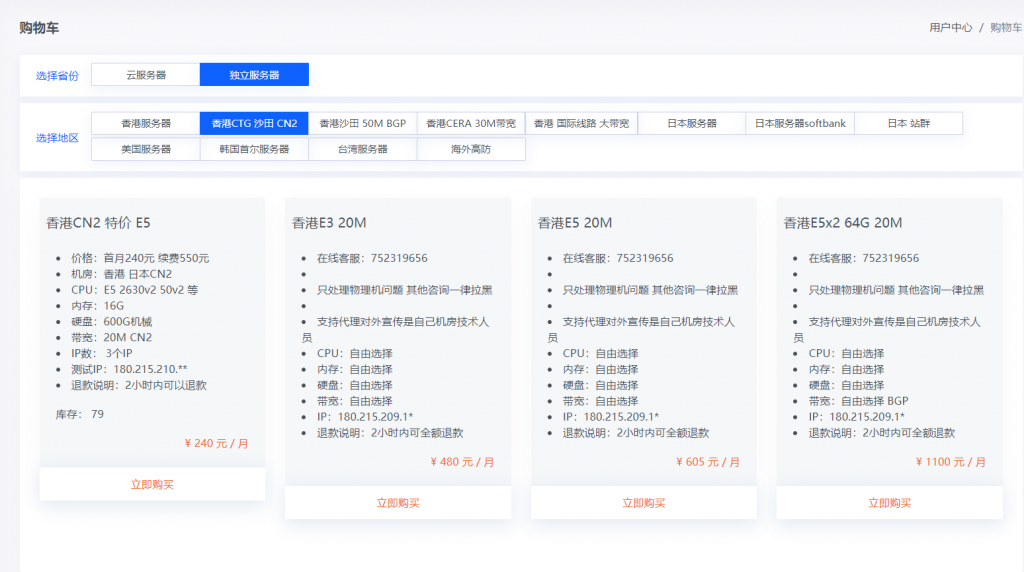
819云(240元)香港CN2 日本CN2 物理机 E5 16G 1T 20M 3IP
819云是我们的老熟人了,服务器一直都是稳定为主,老板人也很好,这次给大家带来了新活动,十分给力 香港CN2 日本CN2 物理机 E5 16G 1T 20M 3IP 240元0官方网站:https://www.819yun.com/ 特惠专员Q:442379204套餐介绍套餐CPU内存硬盘带宽IP价格香港CN2 (特价)E5 随机分配16G1T 机械20M3IP240元/月日本CN2 (...
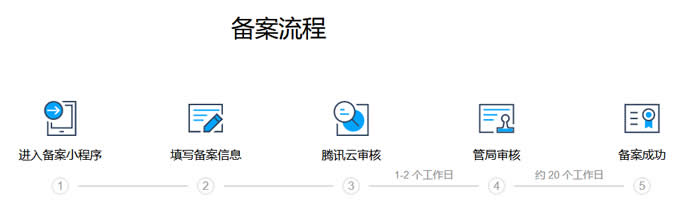
个人网站备案流程及注意事项(内容方向和适用主机商)
如今我们还有在做个人网站吗?随着自媒体和短视频的发展和兴起,包括我们很多WEB2.0产品的延续,当然也包括个人建站市场的低迷和用户关注的不同,有些个人已经不在做网站。但是,由于我们有些朋友出于网站的爱好或者说是有些项目还是基于PC端网站的,还是有网友抱有信心的,比如我们看到有一些老牌个人网站依旧在运行,且还有新网站的出现。今天在这篇文章中谈谈有网友问关于个人网站备案的问题。这个也是前几天有他在选择...
-
软银支付软银支付是帮忙还信用卡的吗,可靠吗316不锈钢和304哪个好保温杯不锈钢316和304哪个好骁龙765g和骁龙865哪个好骁龙865八核2.84H和骁龙855plus八核2.96GHZ那个好了?朱祁钰和朱祁镇哪个好朱高炽在位时间长还是朱祁钰在位时间长?二手车网站哪个好想买个二手车,去哪买比较好苹果手机助手哪个好苹果手机助手哪个好用些谁知道电陶炉和电磁炉哪个好电陶炉和电磁炉哪个好加速器哪个好加速器哪个好用?海克斯皮肤哪个好联盟海克斯科技和抽皮肤哪个合适固定利率和浮动利率哪个好应当选择固定利率,还是选择浮动利率还款?