Compatibilityavmask.net
avmask.net 时间:2021-03-25 阅读:()
IF-AV/DMAviomPro16A-NetInterfaceCardD01106120AIntroductionThankyouforpurchasingtheTASCAMIF-AV/DMAviomPro16A-NetInterfaceCard.
ThiscardallowsyourTASCAMDigitalMixertofeedmonitoraudiotoanynumberofAviomPro16A-NetdevicessuchastheA-16IIPersonalMixer.
Beforeusingtheunit,pleasetaketimetoreadthismanualthoroughlytoensureyouunderstandhowtoproperlysetupandconnecttheunit,aswellastheoperationofitsmanyusefulandconvenientfunctions.
Afteryouhavefinishedreadingthismanual,pleasekeepitinasafeplaceforfuturereference.
YoucanalsodownloadtheOwner'sManualfromtheTASCAMwebsite(http://www.
tascam.
com).
FeaturesTransmissionofupto16channelsofaudio.
Compatiblewith24bitquantizationand44.
1kHzand48kHzsamplingfrequencyConvenienton-screenstereolinkcontrol.
TrademarksTASCAMisatrademarkofTEACCorporation,registeredintheU.
S.
andothercountries.
Aviom,A-Net,andPro16aretrademarksofAviom,Inc.
Othercompanynames,productnamesandlogosinthisdocumentarethetrademarksorregisteredtrademarksoftheirrespectiveowners.
ProductcomponentsTheincludeditemsarelistedbelow.
Takecarewhenopeningthepackagenottodamagetheitems.
Keepthepackagematerialsfortransportationinthefuture.
Pleasecontactthestorewhereyoupurchasedthisunitifanyoftheseitemsaremissingorhavebeendamagedduringtransportation.
Mainunit1Attachmentscrews5Owner'sManual(thisdocument)1Namesandfunctionsofparts1RJ-45ConnectorforA-NetDM-3200/DM-4800requirementsInordertousetheIF-AV/DMcard,theDM-4800/DM-3200mustusesoftwareversion1.
70orlater.
ThemixercannotrecognizetheIF-AV/DMcardwhenusingearlierversions.
ChecktheTASCAMwebsite(http://www.
tascam.
com/)forthelatestDM-4800/DM-3200softwareanddownloadtheTFIupdatefile.
InstallTMCompanion,whichisincludedontheCD-ROMincludedwiththeDM-4800/DM-3200,onthecomputerthatyouareusing.
LaunchTMCompanionandusetheTFIupdatefiletoupgradethesoftwareversionusedbytheDM-4800/DM-3200.
InstallationNOTEDM-3200:InstalltheIF-AV/DMinmixerslot1.
Itwillnotfunctioninslot2.
DM-4800:InstalltheIF-AV/DMinmixerslot1or3.
Itwillnotfunctioninslot2or4.
TurnthemixerpowerOFFbeforebeginninginstallation.
1RemovethefivescrewsfromthecoverpaneloftheslotwhereyouwanttoinstalltheIF-AV/DMcard(slot1onaDM-3200,slot1or3onaDM-4800),andthenremovethepanel.
(Ifthatslotalreadycontainsacard,removethecard.
)2InserttheIF-AV/DMcardintotheslot.
Insertthecardcompletely,aligningitsedgeswiththewhiteguidelinesontheinsideoftheslot.
Pushthecardinuntilitclicksintoplaceanditsbackplateisevenwiththebackofthemixer.
Donot,however,pushthecardtoohard.
Ifyouarehavingdifficultyinsertingitproperly,pullitoutonceandtryagain.
3Usethefivescrewsthatyouremovedearlierorthefivescrewsincludedwiththiscardtofixthecardinplace.
4Turnthemixer'spowerON,andopentheDIGITALscreen(withtheALTkeyindicatorlit,pressscreenmodeselectionkey2).
SelecttheSLOTtab(SLOT1-2orSLOT3-4fortheDM-4800),andconfirmthattheunitrecognizestheinstalledcard.
Ifa"NoCard"messageappears,thecardmightnothavebeeninsertedproperlyorthescrewsmightnotbetightenough.
CompatibilityTheIF-AV/DMinterfacecard,wheninstalledandproperlyconfigured,iscompatiblewiththefollowingAviomPro16Seriesproducts:A-16IIPersonalMixer(theoriginalA-16isnotsupported)A-16Rrack-mountedPersonalMixerAN-16/oOutputModule2TASCAMIF-AV/DMIF-AV/DMAviomPro16A-NetInterfaceCardA-16DProA-NetDistributorAV-P2OutputModuleConnectingPro16devicesWiththeIF-AV/DMcardproperlyinstalledandconfigured,youcannowconnectPro16monitoringandaudionetworkingdevices.
ConnectingaCat-5ecablefromtheA-NetoutputoftheIF-AV/DMcardtotheA-NetInonthefirstPro16devicesstartsanA-Netdistributionnetwork.
NoconfigurationisrequiredfortheAviomdevices.
Pro16A-Netallowsbothserial(daisychain)andparallelconnectiontopologies.
Cat-5ecableconnectionscanbeupto500feet(150meters)betweeneachPro16device.
SimplyconnectA-NetOuttoA-NetInoneachdevice.
ParallelconnectionscanbemadeusingA-Netdistributionhubs(suchastheA-16DorA-16DPro).
ThereisnolimitonthenumberofA-NetDistributorsorA-Netaudiodevicesthatcanbeusedinasystem.
CAUTIONDonotuseshieldedCat-5ecableswithA-Netdevices.
BesuretouseonlystandardCat-5ecables,notthosesoldascrossovercables.
AcrossovercableisnotcompatiblewiththeIF-AV/DMorAviomequipment.
SeriesconnectionsThediagramaboveshowsanIF-AV/DMcardinstalledconnectedinseriestoagroupofA-16IIPersonalMixers.
AnynumberofA-Netdevicescanbeconnectedinthismanner.
Cablesrunscanbeupto500feet,150meterslongbetweendevices.
EachA-16IIPersonalMixershouldbeindividuallypowered.
ParallelconnectionsParallelconnectionsavoidsomeofthepitfallsofaserially-connectedsystem.
EachA-Netdeviceisdirectlyconnectedtoadatasourceinsteadofdependingupontheprevioususerinadaisychainfordatadelivery.
TheprecedingdiagramshowsanIF-AV/DMcardconnectedtoan8-portA-Netdistributor.
TheA-16DProdistributorshownallowsuptoeightsimultaneousparallelA-Netconnections.
Withthisarrangement,powerisalsosuppliedtoeachA-16IIpersonalmixerovertheCAT-5ecable.
AboutPro16A-NetA-NetisAviom'sproprietaryhigh-speeddatatransmissionprotocoldesignedspecificallytotransportuncompressedhighfidelitystreamingaudioinrealtimeoverinexpensiveCat-5ecabling.
A-NetasimplementedinPro16productstransportssixteenchannelsofdigitalaudio(44.
1kHzor48kHz,24-bit)fromtheIF-AV/DMcardtoeachPersonalMixerorAN-16/oOutputModuleconnectedtothesystem.
AnunlimitednumberofPro16A-Netdevicescanbeconnectedtoasystem.
A-Net'sproprietarydesigndeliversultra-lowlatency(lessthan1msecfromanaloginputtoanalogoutput)inallconfigurations.
CAUTIONA-NetisbasedonthephysicallayerofEthernet,whichprovidesPro16A-Netamatureandrobustbaseonwhichtobuild.
However,Aviomproductsarenotcompatiblewithoff-the-shelfcomputerproductsdesignedforEthernetnetworkssuchashubs,routers,andswitches.
CablelengthsYourcablelengthperformancewillbeaffectedbyanumberoffactorsincludingthequalityofthecablesused,andthenumberofdevicessuchascablecouplersusedorwallpanelinterconnectionsinuse.
TogolongerthanthemaximumspecifieddistanceA-Netallows(500feet,150meters),anA-NetDistributorproductcanbeusedasasignalrepeater.
SimplyinserttheA-16DorA-16DProintotheA-Netstreamatthe500-footpointandtheA-Netsignalwillberefreshed.
Another500feet(150meters)ofcablecanthenbeadded.
Thisprocesscanberepeatedasmanytimesasrequiredtoextendcables.
Infact,anyPro16A-NetdevicethathasanA-Netoutconnectorcanbeusedasasignalrepeater.
IF-AV/DMAviomPro16A-NetInterfaceCardTASCAMIF-AV/DM3NOTEUsingtheA-Netoutconnectorof,e.
g.
aA-16IIPersonalMixertoextendthesignaldoesnotsupplypowertotheadditionalunits,whichmustbepoweredindividually.
Forlongdistanceapplications,fiberopticcablecanbeusedtospandistancesupto50miles(80km)withtheuseofdevicescalledmediaconverters.
AmediaconverterchangestheEthernet-basedPro16A-NetsignaltofiberopticatthesourcelocationandthenbacktoCat-5atthedestination.
SeveralcompaniesmakefastEthernettofibermediaconvertersthatcanbeusedwithyourIF-AV/DMandAviomequipment.
MixercontrolscreenOnboththeDM-3200andDM-4800,theIF-AV/DMpresentsasetupdisplayscreenasshownbelow.
NavigatetotheDigitalpage(LCDaccessbutton2withblueALTLEDlit),andthenselecttheSLOTtab(labeledSLOT1-2orSLOT3-4ontheDM-4800)Usethe4arrowkeystotherightoftheLCDscreentomovethecursorovertotheA-NetCardarea.
Itmaybeontheleftortherighthandsideofthescreen,dependingonwhichslotthecardisinsertedinto.
UsetheENTERkeytomakechanges.
TheJOG/DATAdialcanalsobeusedtomovethecursorupanddown.
Thisdisplayhasthefollowing:STATUSThisshowswhethertheIF-AV/DMcarditselfisworkingcorrectlyandthestateoftheA-Net.
CARDStatusOK:TheIF-AV/DMisrunningatfull16channelcount.
UnsupportedFS:Themixerisnotrunningat44.
1kHzor48kHz,sotheIF-AV/DMwillnotpassaudio.
NotResponding:Aproblemwasencounteredduringconfiguration.
A-NetStatusOK:TheIF-AV/DMisconnectedtooneormoreA-Netreceivers.
xxxTimeouts:Aproblemwasencountered.
STEREOLINKUsetheupanddownarrowsandthentheENTERbuttontotogglethestateofthechannelpairsthatyouwishtolinkorunlink.
Whenlinked,thedisplayonthePersonalMixerswillchangetoshowastereospreadcontrolinsteadofapancontrolforthosetwochannels.
Thechannel'svolumewillalsobecontrolledasapair.
CompatibleA-NetdevicesthatdonotrespondtostereolinkingwillnotbeaffectedbychangestotheStereoLinkstatus.
SystemclockingMasterclockWhenconfiguredwithanIF-AV/DM,themixercanhaveanyclocksourceaslongasitis44.
1kHzor48kHz.
TheIF-AV/DMdoesnotoperateatthe2xratesof88.
2kHzand96kHz,sowhenthemixerisrunningattheserates,theA-NetoutputfromtheIF-AV/DMwillbesilent,andtheLCDscreenwillshow"UnsupportedFS"fortheA-NetStatusfield.
VarispeedpitchTheDM-3200andDM-4800canrunatnon-standardSampleRateswhenlockedtoanexternalclock.
TheIF-AV/DMwillfollowalonguptothelimitsofthemixer'sclock.
Herearethesupportedpitchranges.
44.
1kHz:-6.
0%to+6.
0%48kHz:-6.
0%to+6.
0%Outsideoftheseranges,themixerwillmuteandreportaclockerror.
DM-3200/4800settingsTheIF-AV/DMappearstotheMixerjustlikeanyotheroptionalI/Ocardexceptthatitmayhave16channelsofI/Oinsteadof8dependingonwhetherthecardisinsertedintoslot1(orslot3fortheDM-4800).
MixeroutputsBydefault,theDM-3200/DM-4800routesbusses1–16toIF-AV/DMoutputs1-16.
TheseroutingsettingscanbechangedintheOUTPUTSLOTtaboftheDM-3200/DM-4800'sROUTINGscreen.
IF-AV/DMAviomPro16A-NetInterfaceCard1UsethePOD4knobtoselecttheoutputsourcegroupfromtheSOURCESELECTattherightofthescreen.
OptionsforeachoftheoutputsintheoutputsourcegroupselectedhereareshowntheOUTPUTSELECTsectionontheleftofthescreen.
2UsethePOD3knobtoselectanIF-AV/DMoutputchannelgroup(8channels)tosetintheTERMINALSELECTsectioninthecenterofthescreen.
3UsethecursorkeystoselectanoutputchannelintheOUTPUTSELECTsection,andturntheJOG/DATAdialtoselectitsoutputsource.
PresstheENTERkeytoconfirmtheselection.
MixerinputsTheIF-AV/DMdoesnotprovideanyinputstothemixer.
UsingstereolinksYouchooseupto16signalstosendfromtheDM-3200orDM-4800mixertotheAviompersonalmixer.
Thesesignalsareusuallydirectoutsfromthemixerinputs,butcouldbeauxbusses,etc.
These16signalsarefedtoeachAviompersonalmixer,wheretheusermakestheirownmix,asdescribedintheAviomuser'smanual.
Forstereoinputsourcessuchaskeyboards,drummachines,CDplayers,mainmixersub-mixes,etc.
,itisconvenienttobeabletocontrolthevolumeasapair.
Todesignateapairofchannels,theymustbelinkedusingtheMixerControlscreendescribedearlier.
OnlyadjacentChannelscanbelinked(Channels1and2,Channels3and4,etc.
).
WhenChannelsarelinked,theyactasonesourceontheAviomPersonalMixer.
WhenyouselecteitherofthetwolinkedChannelsontheMixer,bothLEDswilllightup,indicatingthattheyarelinked.
VolumechangesaffectbothChannelssimultaneously.
ChannelsthatarelinkedfromtheDM-3200/DM-4800willappearlinkedoneveryPersonalMixerconnectedtothesystem.
Youcanlinkorun-linkChannelsasneeded,evenwhileaudioisrunningthroughthesystem.
AllconnectedPersonalMixersupdateimmediately.
ThespreadcontrolWhentwoChannelsarelinked,theynolongerhaveseparatepancontrolsontheAviomPersonalMixer.
WiththeChannellinkcomesanewfeature,calledSpread.
TheSpreadcontrolvariesthestereoimageofthetwolinkedChannelsfromfullstereotomono.
Thisallowsyoutopositionstereosourcesinyourmixbycontrollingthewidthofthestereoimage.
SpreadchangesthepanningoftheleftandrightChannelssimultaneously.
InsteadofhavingtwoChannelspanned100%leftandright,SpreadallowstheChannelstobepannedto60%leftandright,forexample.
SpecificationsDM-4800/DM-3200requirementsFirmwareDM-3200:Version1.
70orlaterDM-4800:Version1.
70orlaterNote:UsetheTMCompanionsoftwaretoupdatethefirmwareoftheDM-3200/DM-4800.
MixerslotDM-3200:Useslot1DM-4800:Useslot1or3GeneralAudiooutputs:16Quantizationbitrate:24-bitSamplingfrequency:44.
1/48kHzA-Netoutput:RJ-45Compatiblecables:Category5e(straight)Maximumcablelength:150mExternaldimensions:164(w)x40(h)x221(d)mmWeight:0.
3kgTEACCORPORATIONPhone:+81-42-356-91431-47Ochiai,Tama-shi,Tokyo206-8530,JapanPrintedinChina
ThiscardallowsyourTASCAMDigitalMixertofeedmonitoraudiotoanynumberofAviomPro16A-NetdevicessuchastheA-16IIPersonalMixer.
Beforeusingtheunit,pleasetaketimetoreadthismanualthoroughlytoensureyouunderstandhowtoproperlysetupandconnecttheunit,aswellastheoperationofitsmanyusefulandconvenientfunctions.
Afteryouhavefinishedreadingthismanual,pleasekeepitinasafeplaceforfuturereference.
YoucanalsodownloadtheOwner'sManualfromtheTASCAMwebsite(http://www.
tascam.
com).
FeaturesTransmissionofupto16channelsofaudio.
Compatiblewith24bitquantizationand44.
1kHzand48kHzsamplingfrequencyConvenienton-screenstereolinkcontrol.
TrademarksTASCAMisatrademarkofTEACCorporation,registeredintheU.
S.
andothercountries.
Aviom,A-Net,andPro16aretrademarksofAviom,Inc.
Othercompanynames,productnamesandlogosinthisdocumentarethetrademarksorregisteredtrademarksoftheirrespectiveowners.
ProductcomponentsTheincludeditemsarelistedbelow.
Takecarewhenopeningthepackagenottodamagetheitems.
Keepthepackagematerialsfortransportationinthefuture.
Pleasecontactthestorewhereyoupurchasedthisunitifanyoftheseitemsaremissingorhavebeendamagedduringtransportation.
Mainunit1Attachmentscrews5Owner'sManual(thisdocument)1Namesandfunctionsofparts1RJ-45ConnectorforA-NetDM-3200/DM-4800requirementsInordertousetheIF-AV/DMcard,theDM-4800/DM-3200mustusesoftwareversion1.
70orlater.
ThemixercannotrecognizetheIF-AV/DMcardwhenusingearlierversions.
ChecktheTASCAMwebsite(http://www.
tascam.
com/)forthelatestDM-4800/DM-3200softwareanddownloadtheTFIupdatefile.
InstallTMCompanion,whichisincludedontheCD-ROMincludedwiththeDM-4800/DM-3200,onthecomputerthatyouareusing.
LaunchTMCompanionandusetheTFIupdatefiletoupgradethesoftwareversionusedbytheDM-4800/DM-3200.
InstallationNOTEDM-3200:InstalltheIF-AV/DMinmixerslot1.
Itwillnotfunctioninslot2.
DM-4800:InstalltheIF-AV/DMinmixerslot1or3.
Itwillnotfunctioninslot2or4.
TurnthemixerpowerOFFbeforebeginninginstallation.
1RemovethefivescrewsfromthecoverpaneloftheslotwhereyouwanttoinstalltheIF-AV/DMcard(slot1onaDM-3200,slot1or3onaDM-4800),andthenremovethepanel.
(Ifthatslotalreadycontainsacard,removethecard.
)2InserttheIF-AV/DMcardintotheslot.
Insertthecardcompletely,aligningitsedgeswiththewhiteguidelinesontheinsideoftheslot.
Pushthecardinuntilitclicksintoplaceanditsbackplateisevenwiththebackofthemixer.
Donot,however,pushthecardtoohard.
Ifyouarehavingdifficultyinsertingitproperly,pullitoutonceandtryagain.
3Usethefivescrewsthatyouremovedearlierorthefivescrewsincludedwiththiscardtofixthecardinplace.
4Turnthemixer'spowerON,andopentheDIGITALscreen(withtheALTkeyindicatorlit,pressscreenmodeselectionkey2).
SelecttheSLOTtab(SLOT1-2orSLOT3-4fortheDM-4800),andconfirmthattheunitrecognizestheinstalledcard.
Ifa"NoCard"messageappears,thecardmightnothavebeeninsertedproperlyorthescrewsmightnotbetightenough.
CompatibilityTheIF-AV/DMinterfacecard,wheninstalledandproperlyconfigured,iscompatiblewiththefollowingAviomPro16Seriesproducts:A-16IIPersonalMixer(theoriginalA-16isnotsupported)A-16Rrack-mountedPersonalMixerAN-16/oOutputModule2TASCAMIF-AV/DMIF-AV/DMAviomPro16A-NetInterfaceCardA-16DProA-NetDistributorAV-P2OutputModuleConnectingPro16devicesWiththeIF-AV/DMcardproperlyinstalledandconfigured,youcannowconnectPro16monitoringandaudionetworkingdevices.
ConnectingaCat-5ecablefromtheA-NetoutputoftheIF-AV/DMcardtotheA-NetInonthefirstPro16devicesstartsanA-Netdistributionnetwork.
NoconfigurationisrequiredfortheAviomdevices.
Pro16A-Netallowsbothserial(daisychain)andparallelconnectiontopologies.
Cat-5ecableconnectionscanbeupto500feet(150meters)betweeneachPro16device.
SimplyconnectA-NetOuttoA-NetInoneachdevice.
ParallelconnectionscanbemadeusingA-Netdistributionhubs(suchastheA-16DorA-16DPro).
ThereisnolimitonthenumberofA-NetDistributorsorA-Netaudiodevicesthatcanbeusedinasystem.
CAUTIONDonotuseshieldedCat-5ecableswithA-Netdevices.
BesuretouseonlystandardCat-5ecables,notthosesoldascrossovercables.
AcrossovercableisnotcompatiblewiththeIF-AV/DMorAviomequipment.
SeriesconnectionsThediagramaboveshowsanIF-AV/DMcardinstalledconnectedinseriestoagroupofA-16IIPersonalMixers.
AnynumberofA-Netdevicescanbeconnectedinthismanner.
Cablesrunscanbeupto500feet,150meterslongbetweendevices.
EachA-16IIPersonalMixershouldbeindividuallypowered.
ParallelconnectionsParallelconnectionsavoidsomeofthepitfallsofaserially-connectedsystem.
EachA-Netdeviceisdirectlyconnectedtoadatasourceinsteadofdependingupontheprevioususerinadaisychainfordatadelivery.
TheprecedingdiagramshowsanIF-AV/DMcardconnectedtoan8-portA-Netdistributor.
TheA-16DProdistributorshownallowsuptoeightsimultaneousparallelA-Netconnections.
Withthisarrangement,powerisalsosuppliedtoeachA-16IIpersonalmixerovertheCAT-5ecable.
AboutPro16A-NetA-NetisAviom'sproprietaryhigh-speeddatatransmissionprotocoldesignedspecificallytotransportuncompressedhighfidelitystreamingaudioinrealtimeoverinexpensiveCat-5ecabling.
A-NetasimplementedinPro16productstransportssixteenchannelsofdigitalaudio(44.
1kHzor48kHz,24-bit)fromtheIF-AV/DMcardtoeachPersonalMixerorAN-16/oOutputModuleconnectedtothesystem.
AnunlimitednumberofPro16A-Netdevicescanbeconnectedtoasystem.
A-Net'sproprietarydesigndeliversultra-lowlatency(lessthan1msecfromanaloginputtoanalogoutput)inallconfigurations.
CAUTIONA-NetisbasedonthephysicallayerofEthernet,whichprovidesPro16A-Netamatureandrobustbaseonwhichtobuild.
However,Aviomproductsarenotcompatiblewithoff-the-shelfcomputerproductsdesignedforEthernetnetworkssuchashubs,routers,andswitches.
CablelengthsYourcablelengthperformancewillbeaffectedbyanumberoffactorsincludingthequalityofthecablesused,andthenumberofdevicessuchascablecouplersusedorwallpanelinterconnectionsinuse.
TogolongerthanthemaximumspecifieddistanceA-Netallows(500feet,150meters),anA-NetDistributorproductcanbeusedasasignalrepeater.
SimplyinserttheA-16DorA-16DProintotheA-Netstreamatthe500-footpointandtheA-Netsignalwillberefreshed.
Another500feet(150meters)ofcablecanthenbeadded.
Thisprocesscanberepeatedasmanytimesasrequiredtoextendcables.
Infact,anyPro16A-NetdevicethathasanA-Netoutconnectorcanbeusedasasignalrepeater.
IF-AV/DMAviomPro16A-NetInterfaceCardTASCAMIF-AV/DM3NOTEUsingtheA-Netoutconnectorof,e.
g.
aA-16IIPersonalMixertoextendthesignaldoesnotsupplypowertotheadditionalunits,whichmustbepoweredindividually.
Forlongdistanceapplications,fiberopticcablecanbeusedtospandistancesupto50miles(80km)withtheuseofdevicescalledmediaconverters.
AmediaconverterchangestheEthernet-basedPro16A-NetsignaltofiberopticatthesourcelocationandthenbacktoCat-5atthedestination.
SeveralcompaniesmakefastEthernettofibermediaconvertersthatcanbeusedwithyourIF-AV/DMandAviomequipment.
MixercontrolscreenOnboththeDM-3200andDM-4800,theIF-AV/DMpresentsasetupdisplayscreenasshownbelow.
NavigatetotheDigitalpage(LCDaccessbutton2withblueALTLEDlit),andthenselecttheSLOTtab(labeledSLOT1-2orSLOT3-4ontheDM-4800)Usethe4arrowkeystotherightoftheLCDscreentomovethecursorovertotheA-NetCardarea.
Itmaybeontheleftortherighthandsideofthescreen,dependingonwhichslotthecardisinsertedinto.
UsetheENTERkeytomakechanges.
TheJOG/DATAdialcanalsobeusedtomovethecursorupanddown.
Thisdisplayhasthefollowing:STATUSThisshowswhethertheIF-AV/DMcarditselfisworkingcorrectlyandthestateoftheA-Net.
CARDStatusOK:TheIF-AV/DMisrunningatfull16channelcount.
UnsupportedFS:Themixerisnotrunningat44.
1kHzor48kHz,sotheIF-AV/DMwillnotpassaudio.
NotResponding:Aproblemwasencounteredduringconfiguration.
A-NetStatusOK:TheIF-AV/DMisconnectedtooneormoreA-Netreceivers.
xxxTimeouts:Aproblemwasencountered.
STEREOLINKUsetheupanddownarrowsandthentheENTERbuttontotogglethestateofthechannelpairsthatyouwishtolinkorunlink.
Whenlinked,thedisplayonthePersonalMixerswillchangetoshowastereospreadcontrolinsteadofapancontrolforthosetwochannels.
Thechannel'svolumewillalsobecontrolledasapair.
CompatibleA-NetdevicesthatdonotrespondtostereolinkingwillnotbeaffectedbychangestotheStereoLinkstatus.
SystemclockingMasterclockWhenconfiguredwithanIF-AV/DM,themixercanhaveanyclocksourceaslongasitis44.
1kHzor48kHz.
TheIF-AV/DMdoesnotoperateatthe2xratesof88.
2kHzand96kHz,sowhenthemixerisrunningattheserates,theA-NetoutputfromtheIF-AV/DMwillbesilent,andtheLCDscreenwillshow"UnsupportedFS"fortheA-NetStatusfield.
VarispeedpitchTheDM-3200andDM-4800canrunatnon-standardSampleRateswhenlockedtoanexternalclock.
TheIF-AV/DMwillfollowalonguptothelimitsofthemixer'sclock.
Herearethesupportedpitchranges.
44.
1kHz:-6.
0%to+6.
0%48kHz:-6.
0%to+6.
0%Outsideoftheseranges,themixerwillmuteandreportaclockerror.
DM-3200/4800settingsTheIF-AV/DMappearstotheMixerjustlikeanyotheroptionalI/Ocardexceptthatitmayhave16channelsofI/Oinsteadof8dependingonwhetherthecardisinsertedintoslot1(orslot3fortheDM-4800).
MixeroutputsBydefault,theDM-3200/DM-4800routesbusses1–16toIF-AV/DMoutputs1-16.
TheseroutingsettingscanbechangedintheOUTPUTSLOTtaboftheDM-3200/DM-4800'sROUTINGscreen.
IF-AV/DMAviomPro16A-NetInterfaceCard1UsethePOD4knobtoselecttheoutputsourcegroupfromtheSOURCESELECTattherightofthescreen.
OptionsforeachoftheoutputsintheoutputsourcegroupselectedhereareshowntheOUTPUTSELECTsectionontheleftofthescreen.
2UsethePOD3knobtoselectanIF-AV/DMoutputchannelgroup(8channels)tosetintheTERMINALSELECTsectioninthecenterofthescreen.
3UsethecursorkeystoselectanoutputchannelintheOUTPUTSELECTsection,andturntheJOG/DATAdialtoselectitsoutputsource.
PresstheENTERkeytoconfirmtheselection.
MixerinputsTheIF-AV/DMdoesnotprovideanyinputstothemixer.
UsingstereolinksYouchooseupto16signalstosendfromtheDM-3200orDM-4800mixertotheAviompersonalmixer.
Thesesignalsareusuallydirectoutsfromthemixerinputs,butcouldbeauxbusses,etc.
These16signalsarefedtoeachAviompersonalmixer,wheretheusermakestheirownmix,asdescribedintheAviomuser'smanual.
Forstereoinputsourcessuchaskeyboards,drummachines,CDplayers,mainmixersub-mixes,etc.
,itisconvenienttobeabletocontrolthevolumeasapair.
Todesignateapairofchannels,theymustbelinkedusingtheMixerControlscreendescribedearlier.
OnlyadjacentChannelscanbelinked(Channels1and2,Channels3and4,etc.
).
WhenChannelsarelinked,theyactasonesourceontheAviomPersonalMixer.
WhenyouselecteitherofthetwolinkedChannelsontheMixer,bothLEDswilllightup,indicatingthattheyarelinked.
VolumechangesaffectbothChannelssimultaneously.
ChannelsthatarelinkedfromtheDM-3200/DM-4800willappearlinkedoneveryPersonalMixerconnectedtothesystem.
Youcanlinkorun-linkChannelsasneeded,evenwhileaudioisrunningthroughthesystem.
AllconnectedPersonalMixersupdateimmediately.
ThespreadcontrolWhentwoChannelsarelinked,theynolongerhaveseparatepancontrolsontheAviomPersonalMixer.
WiththeChannellinkcomesanewfeature,calledSpread.
TheSpreadcontrolvariesthestereoimageofthetwolinkedChannelsfromfullstereotomono.
Thisallowsyoutopositionstereosourcesinyourmixbycontrollingthewidthofthestereoimage.
SpreadchangesthepanningoftheleftandrightChannelssimultaneously.
InsteadofhavingtwoChannelspanned100%leftandright,SpreadallowstheChannelstobepannedto60%leftandright,forexample.
SpecificationsDM-4800/DM-3200requirementsFirmwareDM-3200:Version1.
70orlaterDM-4800:Version1.
70orlaterNote:UsetheTMCompanionsoftwaretoupdatethefirmwareoftheDM-3200/DM-4800.
MixerslotDM-3200:Useslot1DM-4800:Useslot1or3GeneralAudiooutputs:16Quantizationbitrate:24-bitSamplingfrequency:44.
1/48kHzA-Netoutput:RJ-45Compatiblecables:Category5e(straight)Maximumcablelength:150mExternaldimensions:164(w)x40(h)x221(d)mmWeight:0.
3kgTEACCORPORATIONPhone:+81-42-356-91431-47Ochiai,Tama-shi,Tokyo206-8530,JapanPrintedinChina
- Compatibilityavmask.net相关文档
- jednostavnoavmask.net
- prototypeavmask.net
- DWORDavmask.net
- suspectedavmask.net
- loadsavmask.net
- notesavmask.net
DogYun香港BGP月付14.4元主机简单测试
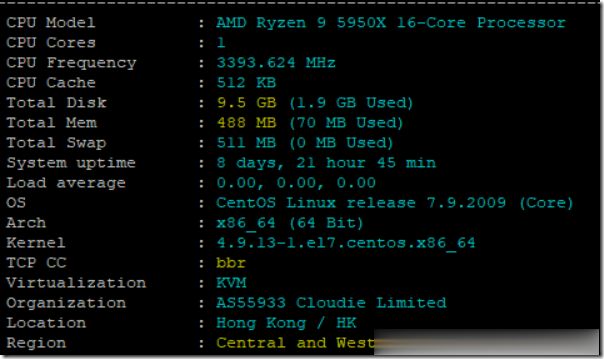
前些天赵容分享过DogYun(狗云)香港BGP线路AMD 5950X经典低价云服务器的信息(点击查看),刚好账户还有点余额够开个最低配,所以手贱尝试下,这些贴上简单测试信息,方便大家参考。官方网站:www.dogyun.com主机配置我搞的是最低款优惠后14.4元/月的,配置单核,512MB内存,10GB硬盘,300GB/50Mbps月流量。基本信息DogYun的VPS主机管理集成在会员中心,包括...
Linode 18周年庆典活动 不断改进产品结构和体验
今天早上相比很多网友和一样收到来自Linode的庆祝18周年的邮件信息。和往年一样,他们会回顾在过去一年中的成绩,以及在未来准备改进的地方。虽然目前Linode商家没有提供以前JP1优化线路的机房,但是人家一直跟随自己的脚步在走,确实在云服务器市场上有自己的立足之地。我们看看过去一年中Linode的成就:第一、承诺投入 100,000 美元来帮助具有社会意识的非营利组织,促进有价值的革新。第二、发...
星梦云:四川100G高防4H4G10M月付仅60元
星梦云怎么样?星梦云资质齐全,IDC/ISP均有,从星梦云这边租的服务器均可以备案,属于一手资源,高防机柜、大带宽、高防IP业务,一手整C IP段,四川电信,星梦云专注四川高防服务器,成都服务器,雅安服务器。星梦云目前夏日云服务器促销,四川100G高防4H4G10M月付仅60元;西南高防月付特价活动,续费同价,买到就是赚到!点击进入:星梦云官方网站地址1、成都电信年中活动机(成都电信优化线路,封锁...
avmask.net为你推荐
-
渣渣辉商标渣渣辉传奇哪个职业好敬汉卿姓名被抢注身份通被人注册了我该怎么办怎么查询商标怎样查询商标有没有被注册方法有哪些?杨紫别祝我生日快乐祝自己生日快乐内涵丰富的话psbc.com邮政储蓄卡如何激活www.228gg.comwww.a8tb.com这个网站该如何改善ww.66bobo.com有的网址直接输入***.com就行了,不用WWW, 为什么?www.javlibrary.com跪求一个JAVHD.com的帐号222cc.com怎样开通网站啊蜘蛛机器人红警2里的蜘蛛机器人怎样对负