转入域名转入godaddy的方法(The method of domain name transferring to Godaddy)
域名转入godaddy的方法The method of domain name transferringto Godaddy
Domain name transfer to Godaddy
Dead work
1, you want to transfer your domain name to GoDaddy, need tocontact your domain name, now the domain name registrar, willunlock your domain name;
2, and then to the current registrar of domain name transferauthorization code;
3, and then conf irm your domain name management, contactmailbox is correct, and you manage to use. If your domain nameuses Whois privacy protection, don't forget to remove thisprotection.
You can query to Who. is your domain name, if it is "Status:clientTransferProhibited", your domain name is in the lockedstate, if the domain name as "Status: OK", you can transfer thedomain name. In addition, don't forget to check the informationin Whois. The key is to manage the contact mailbox correctlyand manage it.
Matters needing attention
ICANN stipulates that the domain name transfer must betransferred to another registrar after the domain nameregistration is completed 60 days or the last time the domain
name registrar has been transferred for 60 days.
When.COM, .NET, .ORG, . INFO, .BIZ, .US, .CC, .TV, .NAME or.WS thesesuffixes have expired, as long as the 45 day grace period canbe transferred to other domain registrar and renewals.Start switching:
First, click on the GoDaddy official website, and then followthe "GoDaddy domain name to Chinese graphics tutorial" step bystep.
One, the mouse moves to the "Domains" menu bar, in the pop-upmenu Midpoint "Transfer Domains to Go Daddy" link. If you wantto transfer multiple domains to GoDaddy at a time, click the"Bulk Transfer" link.
Two, enter the domain name you want to transfer, select suffix,click "GO" button.
Three, prompt "domain name can be transferred", click"Checkout"button to go to the next step. If you want to transferto other domain names, enter the domain name, select suffix,click "GO!" button.
Four, GoDaddy recommend to you related domain name discountpackage, generally will be cheaper than single purchase,according to your needs to choose whether to buy.
Five, domain name renewal period:
The domain name into the renewal period, the default is to renewa year, you can choose a longer renewal according to their ownneeds, in order to avoid losses caused by the domain name forgotto renew.
If your domain name is already in use, it is recommended to keepthe existingDNS server, so as not to cause parsing interruptionin the domain name transfer to GoDaddy.
If your domain name has not been used, it is recommended to usethe GoDaddy DNS server, its DNS function is very powerful, andthis management will be more convenient.
Note: the domain name has been successfully transferred toGoDaddy, the best domain name will be changed to GoDaddy in theDNS server and set the resolution, because some foreign domainname registration in the chamber of Commerce you turn away afterthe domain name resolution service you stop DNS!
In addition, GoDaddy also recommends some products, such as:domain name certificate, virtual host, enterprise post office,domain name advanced services, quick website, etc. , you canchoose whether to buy according to their own needs.
Finally, click the "CONTINUE" orange button to go to the nextstep.
Six, GoDaddy recommended products:
As long as you buy a product recommended by GoDaddy, to nameonly$1.99 (Note: thisprice does not include 20 cent ICANN fee,
only 1 of the domain name to obtain concessions, and mustbe.COM, .NET, .ORG, .US, .BIZ of the five top-level domain namesuff ix) .
GoDaddy virtual host is still very good, the stability is verygood, use a lot of people, if you need a virtual host, you mightas well consider.
In addition to GoDaddy is the world' s largest domain nameregistrar, but also the world' s first big SL securitycertificate SSL security vendors, its official price is veryaffordable, if you use the host GoDaddy SSL guide providessecurity certificate will get preferential purchase links,lower price, Standard SSL (standard) and $12.99 for the same1 years. Contains 1 independent IP address!
GoDaddy other products are more suitable for some enterpriseusers, for individual users, the cost is not high.
Seven, your shopping cart:
Check the shopping cart and show the products you buy. Don'tworry about paying. Don' t forget to check it. If you want tocancel the purchase of a product, you can click the "Remove"link in the item, and if youre select the purchase period, don'tforget to update the shopping cart.
If you have the GoDaddy discount code, you can enter it in thetext box of "If you have Promo or source code enter it here:",and then click the "Apply Code" button on the right to use thediscount code a. The page will automatically refresh, you will
see the use of GoDaddy codes after the discount price, if theprice does not change, your GoDaddy discount code input error,or the coupon code does not apply to the products you buy, theremay be the discount code has expired. Please search the GoDaddydiscount code column to find the latest discount code.Currently GoDaddy supports Alipay, credit card, PayPal, Gift,Card (check gift card) this mode of payment, I believe a lotof friends have Alipay, credit card friends can directly usea credit card or PayPal (more secure, but need to registerPayPal account by credit card verification) payment, thehighest utilizationrate is Alipay in several ways, credit cardand paypal friends but also direct payment.
Don' t forget to agree to the terms of the agreement. If you wantto buy other GoDaddy products, click the black "Keep Shopping"button, and you don't have to pay for the orange Checkout Nowbutton.
Eight. Fill in member account information:
Do not support to fill in Chinese, the general name and addressto complete Pinyin, the mailbox as far as possible using Gmail,Hotmail, Yahoo and other foreign famous mailbox, because somedomestic mailbox can not receive GoDaddy notification mail.Please note that the following behavior may be forced to refundby GoDaddy suspected of fraud:
False information, fill in different addresses in your country,for example, Chinese fill in the address information of the
United states;
If you already have a GoDaddy account, the new account cannotbe the same as the original account information.
Although the GoDaddy marked with * content required, but theproject did not play mobile phone * is to fill in.
(if you don' t have a cell phone and don' t fill it, or you can,you can go to the next step after the error is prompted)Mobile phone fill in format: 86 (China International Code) +your mobile phone number.
Fixed telephone format: 86 (China International Code) + areacode (area code 0 in the front does not add) + your fixedtelephone number.
"Password Hint" password prompt and password is not the same,when you forget the password to play a prompt role to you, helpyou remember the password.
PIN code this item fills 4 digits, its importance is next tothe password, you need to tell GoDaddy your PIN code as identityconfirmation when dialing customer service phone, asking forrefund and other operations.
Other items (3, 4 items) follow the default, and fill in the"CONTINUE WITH CHECKOUT" orange button to go to the next step.Nine. Payment:
Fill in your financial information in GoDaddy, default andmembership account information the same, there is generally noneed to make any changes.
The credit card number and the name are filled according to yourcredit card.
Credit card type to see your credit cardright lower corner Logoto choose, domestic generally is Visa and Mastercard.GoDaddy credit card is valid for the month is the abbreviationEnglish, cannot read his count, from January to December of theorder.
If there is a GoDaddy Card Gift gift card that can be used tooffset the money, you don' t have to have it without a gift card.Fill in all the information. "Checkout Now" orange button canbe paid.
Ten, purchase completed:
You've already bought it! GoDaddy will send you a notificationemail.
You can now enter your account to view and transfer to yourdomain name.
Eleven, the page left menu bar, point "Domain Manager" link intoyour GoDaddy domain name management page.
Twelve. Select "Pending Transfers" in "Domains" menu".Thirteen, select the domain name you want to transfer, clickthe "Authorization" button, and select "Begin TransferAuthorization" in the pop-up menu".
Fourteen. Copy the domain name sent by GoDaddy, transfer thedomain name to ID and security code.
Fifteen, the GoDaddy sent to your domain name to ID and securitycode to fill in the corresponding position in the page, point"Next" to the next step.
Sixteen, select "Authorize", which means that you allowpermission to transfer the domain name to your GoDaddy account.Seventeen, after the domain name, you enter the domain name fromwhich the current registrar where the domain name out of theauthorization code, point "Finish" complete domain nametransfer authorization process.
Eighteen, prompt you have submitted domain name transferauthorization code, and so on a few minutes, the state changecan be effective.
Nineteen, if you fill out the transfer of the domain namewithout authorization code, the domain name also lifted thedomain name out of lock, refresh the page, you can see the statuschange to "the domain transfer process, without operation".
Twenty, and then wait for a period of time, the state changedto "the current registrar to accept the turn out", waiting forthe domain name registrar to send you the confirmation of thetransfer mail on the line, about 2 days or so can receive.After receipt, according to the prompt operation in the mail,the operation of each domain name registrar is basically thesame. Generally, there is a link in the mail. After you clickenter, you can confirm or cancel the domain name. In this way,your domain name will be transferred to your GoDaddy accountimmediately.
- 转入域名转入godaddy的方法(The method of domain name transferring to Godaddy)相关文档
- 域名Godaddy域名如何修改whois信息
- 您的godaddy 域名被盗 帐号被盗 邮箱被改 找回全过程
- 新网国内域名 新网、万网等 被盗 被转入 godaddy 找回全过程 最新教程(Domestic domain new network, Wan net stolen was transferred to the GoDaddy to find the whole process of the new course)
totyun:香港cn2 vps,5折优惠,$6/月,10Mbps带宽,不限流量,2G内存/2核/20g+50g
totyun,新公司,主要运作香港vps、日本vps业务,接入cn2网络,不限制流量!VPS基于KVM虚拟,采用系统盘和数据盘分离,从4G内存开始支持Windows系统...大家注意下,网络分“Premium China”、“Global”,由于站长尚未测试,所以也还不清楚情况,有喜欢吃螃蟹的尝试过不妨告诉下站长。官方网站:https://totyun.com一次性5折优惠码:X4QTYVNB3P...
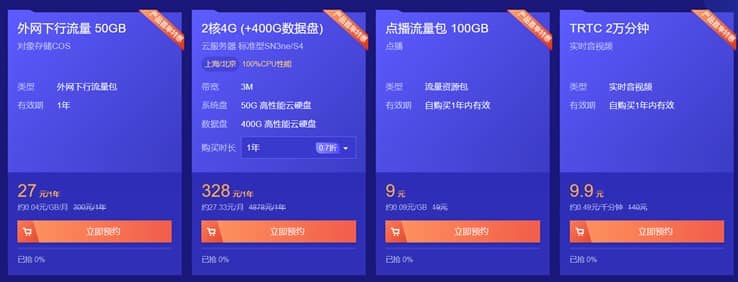
腾讯云CVM云服务器大硬盘方案400GB和800GB数据盘方案
最近看到群里的不少网友在搭建大数据内容网站,内容量有百万篇幅,包括图片可能有超过50GB,如果一台服务器有需要多个站点的话,那肯定默认的服务器50GB存储空间是不够用的。如果单独在购买数据盘会成本提高不少。这里我们看到腾讯云促销活动中有2款带大数据盘的套餐还是比较实惠的,一台是400GB数据盘,一台是800GB数据盘,适合他们的大数据网站。 直达链接 - 腾讯云 大数据盘套餐服务器这里我们看到当前...
Virmach$7.2/年,新款月抛vps上线,$3.23/半年,/1核640M内存/10 GB存储/ 1Gbps/1T流量
Virmach自上次推出了短租30天的VPS后,也就是月抛型vps,到期不能续费,直接终止服务。此次又推出为期6个月的月抛VPS,可选圣何塞和水牛城机房,适合短期有需求的用户,有兴趣的可以关注一下。VirMach是一家创办于2014年的美国商家,支持支付宝、PayPal等方式,是一家主营廉价便宜VPS服务器的品牌,隶属于Virtual Machine Solutions LLC旗下!在廉价便宜美国...
-
ovOV摄像头是哪个国家的解压程序什么解压软件最好,速度最快最稳定人人时光机求 《小叮当》的日语歌词。最好有片假名的打开网页出现错误网页上有错误怎么解决?今日热点怎么删除千牛里面的今日热点怎么取消_?办公协同软件免费的多人协同办公软件哪些,我了解的有钉钉、企业微信,其他的还有么?iphone越狱后怎么恢复苹果手机越狱之后能恢复原来吗?开机滚动条电脑开机启动滚动条时间长怎么办?淘宝网页显示不正常淘宝网显示不正常idc前线求电影敢死队电影里的歌曲!